Easy Disk

Easy Disk

Festplatten-Analyse: auf einen Blick sehen, wohin der Speicher ging — Rot/Grün trennt Systemordner von deinen Daten

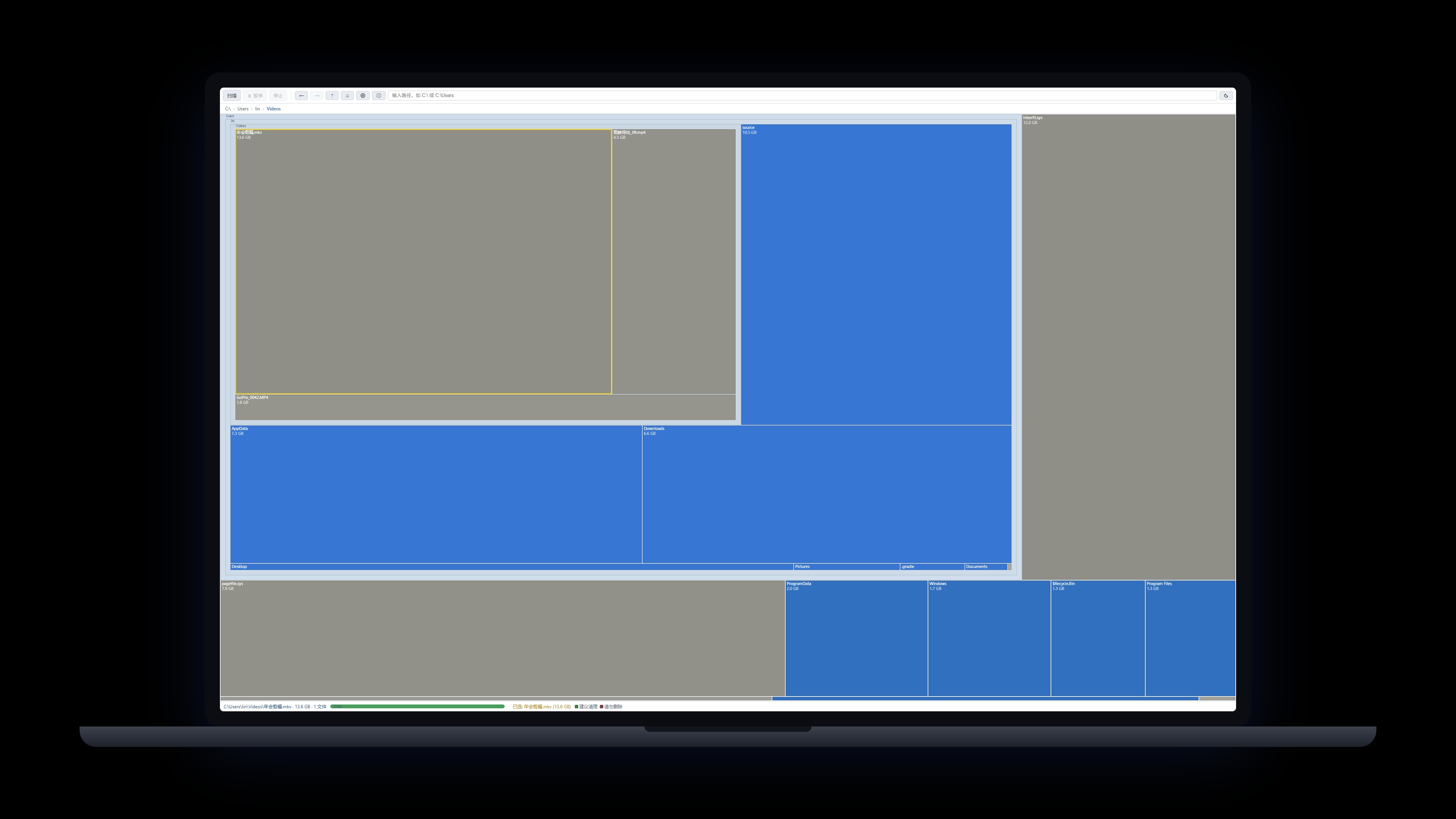
Ein rein lesender Speicherplatz-Analysator, der dein ganzes Laufwerk als eine einzige Treemap darstellt: Fläche gleich Belegung, die größten Verursacher fallen sofort auf. Easy Disk liest und visualisiert nur — es löscht, verändert oder „optimiert“ nichts; eingebaute Rot/Grün-Markierungen (Rot = geschützte Systempfade, Grün = Cache/Nutzerdaten) helfen bei deiner eigenen Einschätzung. Alles bleibt auf deinem Rechner — keine Uploads; ein Klick zeigt den Ordner im Explorer oder Finder, jede Aktion bleibt deine.

Windows 10/11 · macOS (Apple Silicon) · lokaler Scan · keine Uploads · v0.9.11

Easy Disk Zurück zu den Produkten>

Download-Version wählen

DirektDownload von unserer Website — kein Store-Drittanbieter nötig. Melde dich überall mit derselben E-Mail an; ein Abo gilt für alle Apps.

Windows v0.9.11 Empfohlen

Installer

Für die meisten richtig: geführte Einrichtung mit Desktop- und Startmenü-Verknüpfung — nach der Installation sofort startklar.

Windows 10/11 · x64 · ca. 6.0 MB
Download für Windows
macOS v0.9.11 Offiziell

macOS-Version

Für Apple Silicon (M-Serie): dmg öffnen und die App in Programme ziehen.

macOS · Apple Silicon · ca. 5.1 MB

Download für macOS

Ein Abo für alle Apps: Alle Desktop-Produkte teilen sich Konto und Mitgliedschaft — weitere Installationen kosten nichts extra.Mitgliedschaft ansehen →

Funktionen

Nur-Lesen by Design: löscht, verändert oder „optimiert“ keine Dateien — Easy Disk analysiert und lokalisiert nur; die Entscheidung triffst du selbst, im Explorer oder im Finder
Treemap auf einen Blick: Fläche gleich Belegung — große Verursacher sofort erkennen
Rot/Grün-Sicherheitsmarkierungen: Rot = geschützte Systempfade, Grün = Cache und Nutzerdaten (37 Regeln eingebaut, anpassbar)
Zeichnet während des Scans: fortschreitendes Rendern, mit Pause/Fortsetzen/Stopp
Klick zur Auswahl, Doppelklick zum Abtauchen, Breadcrumbs, Strg+Rad zum Zoomen, Ziehen zum Verschieben
Echtzeit-Namensfilter mit Platzhaltern (* ?) — ohne erneuten Scan
Rechtsklick direkt zum Explorer; kompletter Scan auf dem Gerät, nichts wird hochgeladen

Versionshinweise

v0.9.11 2026-10-17
  • A macOS (Apple Silicon) edition is now available: volume and folder enumeration, the treemap view and the red/green cleanup markers all follow macOS semantics, and scanning still runs entirely on your machine with no file data uploaded.
  • Windows behavior is unchanged; both platforms ship one version built from one codebase, and the Mac installer and Mac update channel go live together.
v0.9.10 2026-10-12
  • The main executable and local data directory now follow the repository name: the app binary is easy_disk.exe (was hard_disk_analysis.exe, cleaned up automatically on install) and the app-data identifier was renamed in step. Expect one re-login and one fresh scan after upgrading; your account, subscription and the easydisk:// deep link are unaffected, and the bundled hda-cli command-line tool keeps its name.
v0.9.9 2026-10-04
  • Fixed login state being lost after restart — account data is now saved reliably
  • Fixed sign-in failures caused by repeated clicks on the sign-in button
  • Automatic retries on network hiccups for more reliable sign-in
  • Security hardening: minimized CSP with the account center domain allowlisted
v0.9.8 2026-10-01
  • Internal dependency upgrade: UI kit and account SDK now distributed as npm packages (@pinnadash/ui-kit, @pinnadash/account-sdk); no functional changes.
v0.9.7 2026-09-30
  • Settings > General redesign: card layout, language switcher is now a dropdown (ready for more languages)
  • Title bar now has three buttons: minimize, maximize/restore and close, on both the main and settings windows
  • New: export scan reports as HTML and CSV to your Documents folder
v0.9.6 2026-09-23
  • Returning from the browser brings the window to the front in one click
  • Installer upgrade: deep-link return-to-app no longer breaks after an overwrite install
v0.9.5 2026-09-23
  • The Account page now lists your sign-in email, membership badge, subscription start, expiry date (with days left) and last sync time
  • A sign-in prompt appears when you are logged out, and offline-grace status shows on the badge
v0.9.4 2026-09-23
  • Install and auto-update are more reliable: stale processes are closed before upgrading, and the command-line tool is installed and removed together with the app
  • The installer now follows our unified standard: the publisher shows as Pinnadash and the executable name is normalized
v0.9.3 2026-09-21
  • Scan memory fix: no more freezes on huge drives; UI memory is now bounded
  • Skip directory junctions/symlinks: no more infinite recursion or double-counted sizes
  • Directories expand on demand; partial data is viewable mid-scan
  • The Scan button now opens a drive picker dialog for easy switching
  • Observability: scan progress/memory logged; renderer hangs detected by heartbeat watchdog
  • New --exit-after-scan flag for unattended automation
v0.9.2 2026-09-14
  • Tray menu blank-space fix: the menu card height now adapts to its content in real time, eliminating the extra blank area at the bottom; popup positioning is more stable.
v0.9.1 2026-09-14
  • Tray menu fully aligned with the design standard: removed the redundant menu item (left-click the tray icon to reopen the window), closing the window now hides it to the tray (use the tray menu to quit), and the right-click menu is redrawn in a brand-new custom style — white rounded card, roomy spacing, line icons, following the app's light/dark theme, matching Easy Screenshot.
v0.9.0 2026-09-12
  • Account system: new Account group at the top of Settings — sign in via system browser (one-time email link) with automatic deep-link return; shows email, plan and expiry inline with manage subscription, refresh and sign-out; 7-day offline grace for member entitlements.
  • hda-cli ships with the installer: no admin required, full CLI for scanning and red/green rule checks with --json/--depth/--top; 37 rules ported 1:1 from the GUI, SKILL.md available on the website for agent integration.
v0.8.0 2026-09-12
  • New system tray: right-click menu to open the app, jump to Settings, or quit; labels follow the system language
  • Frameless custom title bar: drag anywhere to move the window, with window controls and theme-aware styling
  • Check-for-updates and version info moved into Settings, leaving a cleaner toolbar with a single gear entry
v0.7.0 2026-09-11
  • New settings page bundling theme (system/light/dark, follows system by default) and language
  • In-app update checking: one-click from the toolbar plus silent automatic checks
  • Full English/Chinese interface with instant switching
v0.6.1 2026-09-11
  • New toolbar Check for updates button; update checks also run automatically at launch
  • First-round UI standard compliance fixes
v0.6.0 2026-09-09
  • Windows desktop app officially released with direct download
  • Fast native scan engine + file-level treemap; installer only ~4MB
  • Red/green safety marks (37 built-in rules) and command-line scanning
Fragen? Schau ins FAQ >