Easy Image

Easy Image

Procesado por lotes: marca de agua, conversión y compresión, todo en tu dispositivo

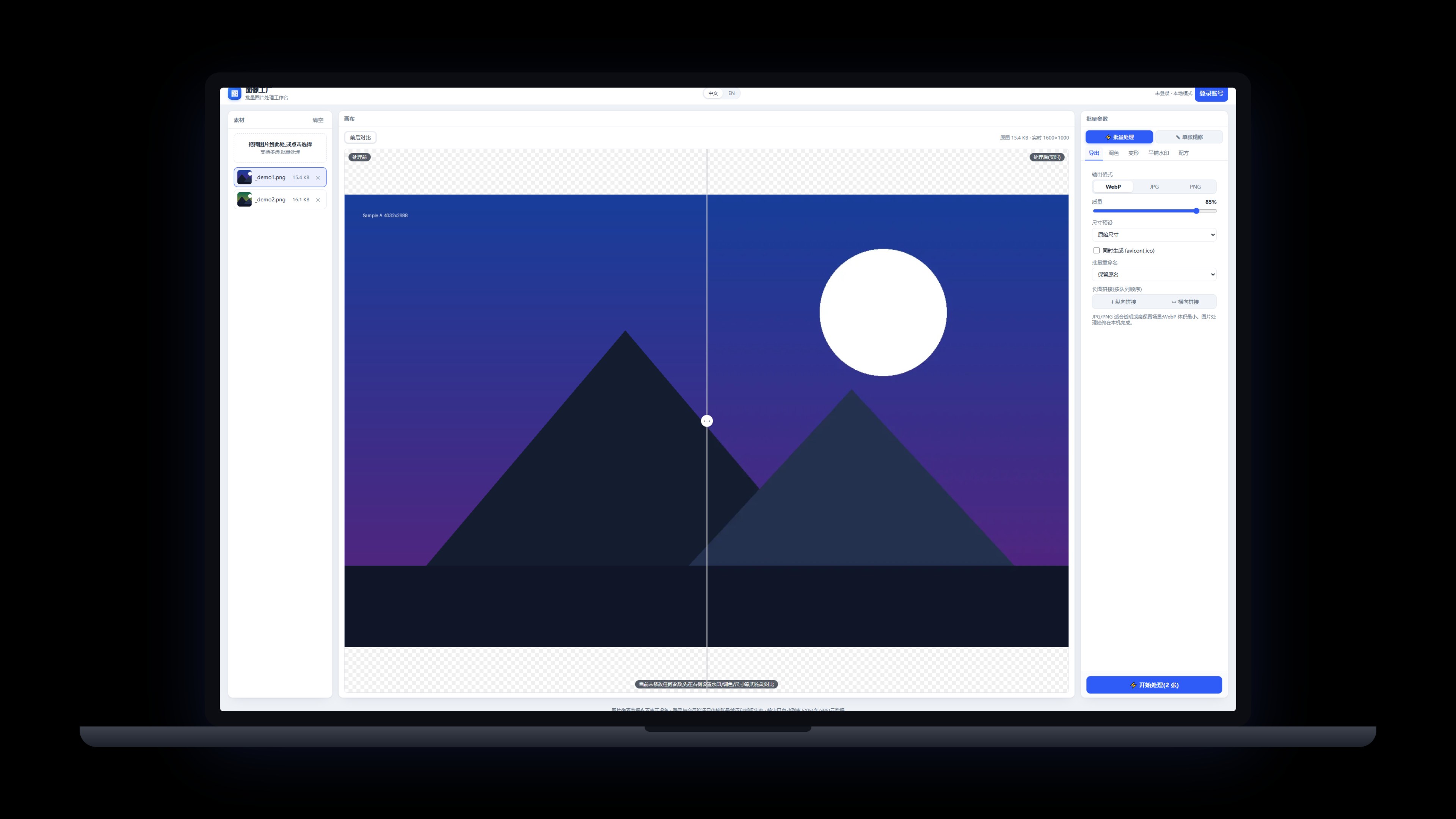
Marcas de agua, rotar/voltear, conversión de formato, compresión, procesamiento por lotes y retoque individual (recorte y mosaico). Todo se procesa en tu dispositivo: las imágenes nunca lo dejan y la salida se limpia automáticamente de metadatos EXIF (incluido el GPS).

Windows / macOS (Apple Silicon) · en el dispositivo · imágenes nunca subidas · v0.4.8

Easy Image Volver a Productos>

Elige tu descarga

Descargas directas desde nuestro sitio, sin tiendas de terceros. Inicia sesión con el mismo correo en cualquier app; una suscripción cubre todas.

Windows v0.4.8 Recomendado

Instalador

Ideal para la mayoría: instalación guiada que crea accesos en el escritorio y el menú de inicio, lista para usar al terminar.

Windows 10/11 · x64 · aprox. 3.7 MB
Descargar para Windows
macOS v0.4.8 Oficial

Versión para macOS

Para Apple Silicon (serie M): abre el dmg y arrastra la app a Aplicaciones.

macOS · Apple Silicon · aprox. 4.5 MB

Descargar para macOS

Una suscripción para todas las apps: todos los productos de escritorio comparten cuenta y membresía, instalar más no cuesta extra.Ver membresía →

Características

Marcas de agua: texto o imagen, aplicadas por lotes
Conversión de formato y compresión con mínima pérdida de calidad
Procesado por lotes más retoque individual (recorte y mosaico)
Ajustes cotidianos como rotar y voltear
Totalmente en tu dispositivo: las imágenes nunca salen de tu equipo
Salida limpia automáticamente de metadatos EXIF (incluido el GPS)

Registro de cambios

v0.4.8 2026-10-25
  • Fixed the Start button hanging on “Processing” after a click
  • Single-image tools (Crop / Mosaic / Move watermark) now switch from the right-hand panel, matching batch mode
v0.4.7 2026-10-12
  • Sign-in state now survives restarts: added the missing file permissions the app needs to store its account snapshot, so a signed-in app stays signed in
  • Interface v2 across the app: switches, custom-drawn dropdowns, unified radii and colours, following light and dark themes (shared component library 0.11.1)
  • Sign-in issues are now self-checkable: opening the browser, the return handoff and saving the state each leave a line in the local log, and the Settings page log-folder button reports failures plainly
  • Product identifier unified as easy-image: the sign-in return protocol and the account-centre client id now match the website name; existing installs keep signing in
v0.4.6 2026-09-30
  • Language switcher is now a dropdown; the title bar gains a maximize/restore button
  • General settings restyled as a card with proper spacing
  • Security hardening: result filename sanitization, export path checks, explicit account errors
v0.4.5 2026-09-23
  • Fix: account login didn't take effect — the return-to-app callback was never received, so the UI stayed signed out
  • Fix: 'Continue and return to app' no longer spawns a second Easy Image; it raises your existing window
  • Installer upgrade: deep-link return-to-app no longer breaks after an overwrite install
v0.4.4 2026-09-23
  • The Account page now lists your sign-in email, membership badge, subscription start and expiry date; lifetime plans show as permanent
  • A sign-in prompt appears when you are logged out, and offline-grace status now shows on the badge
v0.4.3 2026-09-23
  • Install and auto-update are more reliable: stale processes are closed before upgrading, so overwriting files no longer gets stuck
  • The installer now follows our unified standard: the publisher shows as Pinnadash and the executable name is normalized
v0.4.2 2026-09-22
  • Unified About/Account cards: header row joins the card body; settings layout aligned with company standard
v0.4.1 2026-09-19
  • Account sign-in and membership moved into Settings → Account; cleaner top bar
  • About page adds Terms of Service, Privacy Policy, Contact Us and Report a Problem
v0.4.0 2026-09-12
  • Freemium gate: the free plan processes up to 20 images per batch; members get unlimited batches (CLI included)
  • Fixed the missing sign-in entry in production builds; account login and membership now work
v0.3.0 2026-09-11
  • Pinnadash account sign-in with membership status sync
  • Settings move to a dedicated page with dark theme support (system/light/dark) and language options
  • In-app update checks (manual + automatic) and full desktop UI standard compliance
v0.2.3 2026-09-11
  • New settings page with a Check for updates entry; update checks also run automatically at launch
  • First-round UI standard compliance fixes
v0.2.1 2026-09-08
  • Default language switched to English; Chinese switchable in settings
  • Account section fully bilingual
v0.2.0 2026-09-07
  • Windows desktop app officially released with direct download
  • Account integration with one-click sign-in that hands back to the app
  • Per-machine install to Program Files
¿Dudas? Consulta las FAQ >