Easy Flow

Easy Flow

Folder monitoring — auto compress, convert and archive images

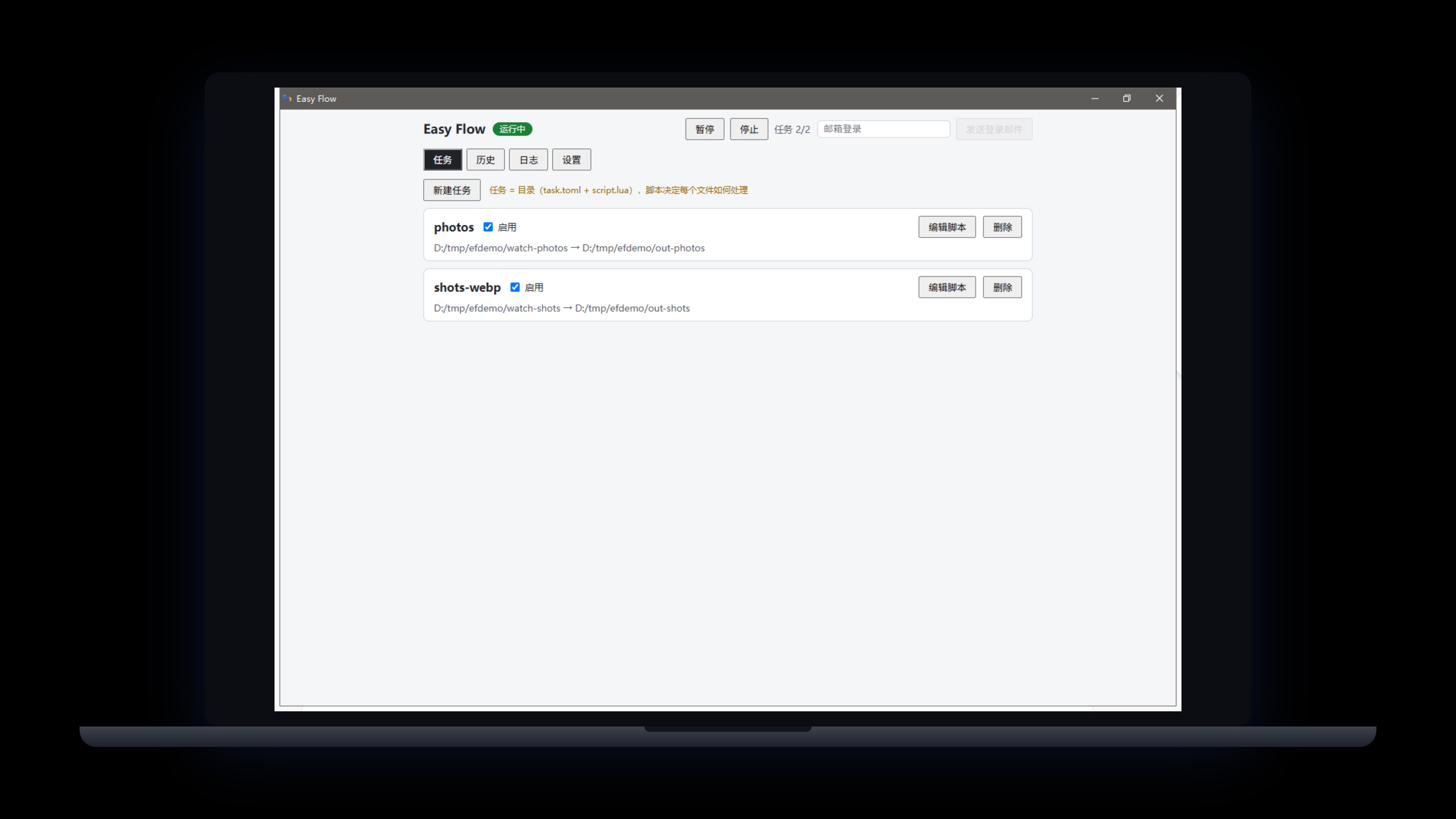
Watches your folders and processes new images as they land: WebP/AVIF compression with target size caps, archiving by EXIF capture date, camera or orientation. Processing logic is Lua scripting inside a sandbox — scripts only express intent, the engine does all writing. Originals are never deleted (archived to _originals/, failures quarantined). AI generates scripts in the GUI; autoflow CLI included.

Windows / macOS (Apple Silicon) · tray app · Lua scripted tasks · v0.9.7 with CLI

Easy Flow Back to Products>

Choose your download

Direct downloads from our site — no third-party store needed. Sign in with the same email on any app; one subscription covers them all.

Windows v0.9.7 Recommended

Installer

Best for most people: a guided setup that creates desktop and Start Menu entries, ready to use right after install.

Windows 10/11 · x64 · approx. 5.6 MB
Download for Windows
macOS v0.9.7 Official

macOS build

For Apple Silicon (M-series): open the dmg and drag the app into Applications.

macOS · Apple Silicon · approx. 6.9 MB

Download for macOS

One subscription covers every app: all desktop products share the same account and membership, so installing more costs nothing extra.See membership →

Features

Watches folders and processes new images automatically
WebP/AVIF compression with target size caps and auto quality fallback
Archive by capture date, camera, orientation or any rule
Lua scripts in a sandbox: no file IO — scripts express intent, the engine writes
Originals never deleted: archived to _originals/, failures quarantined
AI script generation in the GUI, with the autoflow CLI

Changelog

v0.9.7 2026-10-12
  • Interface v2 across the app: switches, custom-drawn dropdowns, unified radii and colours, following light and dark themes
  • Native form controls are unified: boolean settings become switches, and dropdowns no longer fall back to the OS default look
  • Tab and settings-page switches reset the scroll position — one shared scroll container, so no page starts half-scrolled
  • The macOS build ships the same v2 interface as Windows; sign-in window raise, the custom tray menu and Reveal-in-Folder follow native macOS behaviour
v0.9.6 2026-10-10
  • New macOS build (Apple Silicon): official installer — drag Easy Flow into Applications to install
  • Layout fix: switching tabs or settings pages no longer shifts the panel — content width stays aligned
  • Interface now available in five languages, switchable from the top bar
  • Account SDK update fixes a sign-in race and adds network retries for weak connections
v0.9.4 2026-09-23
  • Login return-to-app now raises the window, both on cold start and while running
  • Installer upgrade: deep-link return-to-app no longer breaks after an overwrite install
v0.9.3 2026-09-23
  • The Account page now lists your sign-in email, membership badge, subscription start, expiry date and last sync time; lifetime plans show as permanent
  • A sign-in prompt appears when you are logged out, and offline-grace status is shown directly on the badge
v0.9.2 2026-09-23
  • Install and auto-update are more reliable: stale processes are closed before upgrading and PATH registration no longer hangs the installer
  • The installer now follows our unified standard: the publisher shows as Pinnadash and the executable is renamed to easy_flow.exe, so shortcuts point at one program
v0.9.1 2026-09-22
  • Settings groups unified as cards, aligned with the company UI standard
  • UI layer modernized; About/Account sections now use the company-standard components
v0.9.0 2026-09-20
  • Template library reorganized into four categories (Convert & compress / Organize / Selective / Multi-output) with category filters in the New Task dialog
  • New "AVIF + WebP dual-format delivery" template: one input produces both AVIF and WebP outputs
  • Fixed swallowed engine start failures, false-positive background starts, and 8-hour-off history timestamps; new "Open log folder" in Settings
  • Logs now roll daily with crash capture; tray menu redesigned (dual theme, adaptive height)
v0.8.2 2026-09-12
  • Tray menu simplified to Pause watching | Preferences... | Quit, consistent across our desktop apps; left-click the tray icon to reopen the main window
v0.8.1 2026-09-12
  • Settings gains an Account section: sign-in, plan, expiry, upgrade and sign-out all in one place for a cleaner top bar
  • About adds entries for Terms of Service, Privacy Policy, Contact Us and Report a Problem (opened in your browser)
  • Fixed the custom title bar not being draggable; settings sections reordered with Account first and About last
v0.8.0 2026-09-12
  • Frameless custom title bar: drag the whole top edge to move the window, with new minimize/close buttons that follow the theme
  • Tray menu gains a Settings item that opens the main window straight to the Settings page
  • Narrower settings sidebar, now consistent across all desktop apps
v0.7.0 2026-09-11
  • Settings gain a General tab bundling theme (system/light/dark) and language; top-bar toggles removed
  • Theme now follows the system by default with a three-way picker
v0.6.0 2026-09-11
  • Sign-in unified with Easy Screenshot & Easy Clipboard: opens the account center in your browser, returning users get back in one click
  • Full desktop UI standard compliance: dual themes (follow system), sidebar-style settings, toast feedback
  • 11 built-in task templates (WebP/AVIF compression, date/camera organizing, format sorting and more) — one click to create a task
  • "Process Now" for existing files, folder-browse pickers, and automatic GIF animation protection
  • Bilingual interface (English by default); engine logs localized to English
  • CLI adds task templates and task create --template
v0.5.1 2026-09-11
  • Check for updates in Settings > About, plus automatic checks at launch
  • First-round UI standard compliance fixes
v0.5.0 2026-09-09
  • Windows desktop app officially released with direct download
  • Unified accounts: magic-link sign-in, 2 tasks free, unlimited with membership
  • AI script generation in the GUI; unified Easy-series naming
Questions? Check the FAQ >